

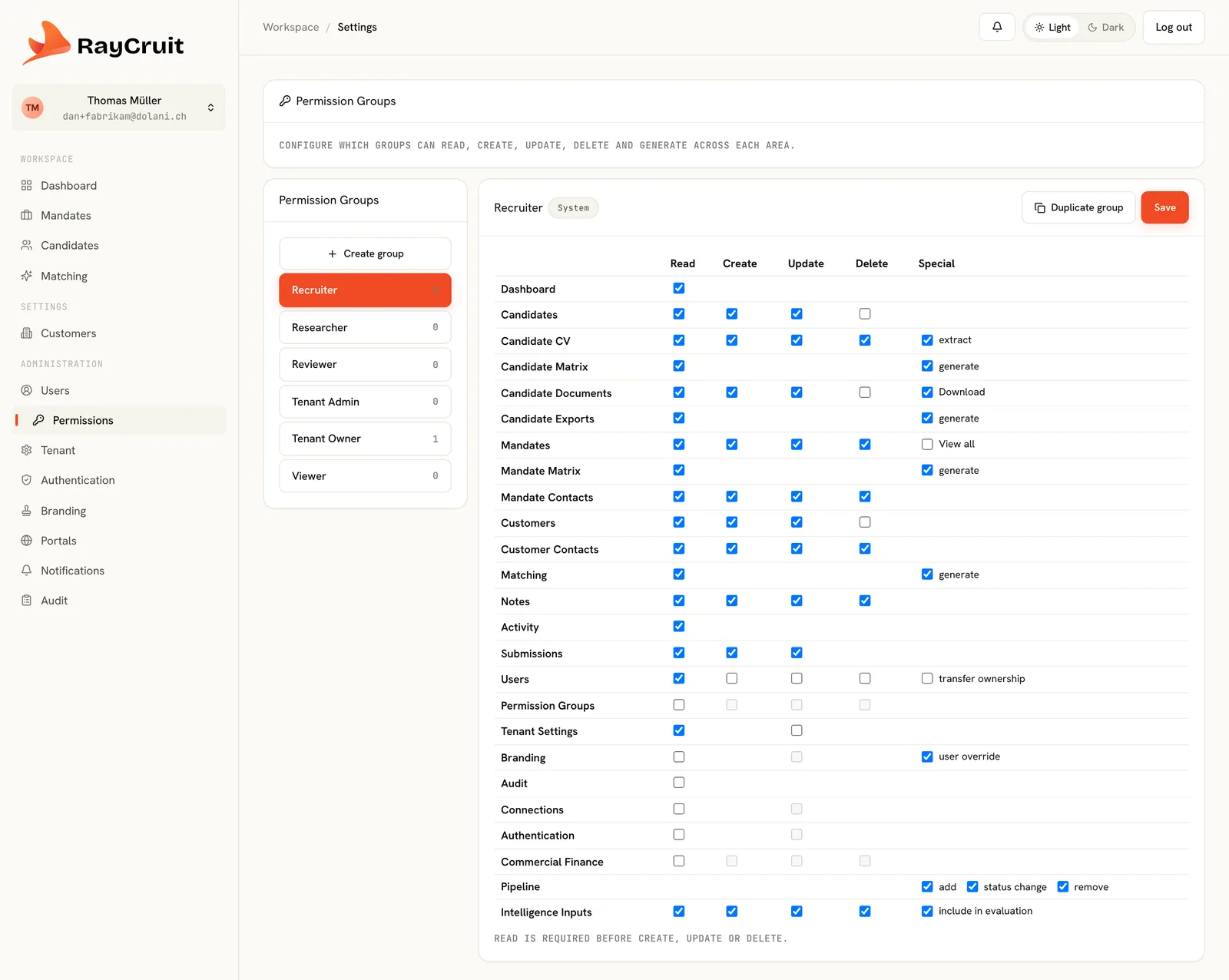
Permission groups
Groups define create, read, update and delete rights per object type, plus special permissions for sensitive operations — so access is granted deliberately rather than inherited by accident.
Governance, Permissions & Audit
Search firms need both: a pool everyone can draw on, and mandates only three people may know exist. That only works if access is controlled by role, down to each kind of record, and every action leaves a trace. RBAC (Role-Based Access Control) is what makes it practical: you decide who may see and edit candidate data, customer information or commercial terms — a researcher can work a mandate without ever seeing the fee attached to it. RayCruit is built around that requirement rather than adding it afterwards.
The problem
Most systems offer a handful of roles and little else. A firm then has to decide whether to share everything internally — which makes a confidential C-level search impossible — or lock things down to the point where the shared pool loses its value. Neither answer is acceptable, so the confidential searches end up in a spreadsheet outside the system.
Access control operates at the object level, roles reflect how search firms actually divide work, and the audit trail is separated by purpose.
Groups define create, read, update and delete rights per object type, plus special permissions for sensitive operations — so access is granted deliberately rather than inherited by accident.
Owner, Admin, Recruiter, Sourcer, Reviewer and Read-only reflect the way a search firm actually divides its work, rather than a generic admin-or-user split.
An individual mandate carries its own access list. A confidential executive search stays visible only to its assigned team, inside the same tenant as everything else.
The right to download a candidate document is granted explicitly, because viewing a profile and taking a copy of a CV are different acts.
Each firm operates in its own tenant with its own subdomain, branding and white-labelled login. Data does not cross tenant boundaries.
OIDC single sign-on with automatic user provisioning, plus two-factor authentication the firm can enforce across the whole tenant.
A readable history on every customer, mandate and candidate — what happened, when, and who did it.
A separate audit log that records security-relevant events and cannot be edited after the fact, kept distinct from the business timeline so each serves its own audience.
Candidate and customer portals run on their own access model and cannot reach the recruiter workspace or each other's data.
Governance is configured once at tenant level, then applied per mandate as sensitivity requires.
Decide, for each kind of user and each record type, who may view, create, edit and delete — plus special rights such as exporting or seeing fee amounts.
Place users into the six roles according to how the firm divides delivery work.
Connect OIDC, turn on provisioning and enforce two-factor across the tenant.
Give confidential searches their own access list at creation.
Business timelines for delivery review, the security log for audit.
A CEO replacement runs inside the platform with an access list of four, rather than in a spreadsheet nobody can audit.
External sourcers get exactly the rights to build candidate records and nothing else — no client data, no commercial terms.
An enterprise client asking how their data is protected gets a concrete answer about roles, isolation and audit.
Even the most sensitive search stays governed and auditable.
A shared pool works because access is precise, not because everyone trusts everyone.
Data-protection questions have documented answers.
See it in motion
How the modules hand over to each other in the real product — customer and mandate, candidate and matrix, the workspace where a pairing is decided, and the material that goes to the client.
2 min
Continue across the platform
Every output checked against a fixed structure, versioned prompts, provider logging and staleness control.
Learn moreA white-label portal where candidates keep their own details current — and you approve every change.
Learn moreBranded, invitation-only access for named client contacts — no shared logins, no attachments.
Learn moreA demo follows one mandate across every module, which is the only way the connections become obvious.